
Training in exocad and Blender for Dental
Courses for dental technicians and clinics that want to design with confidence in exocad and Blender for Dental, one to one or for a team, in person, live online or on video. They are taught by an exocad Certified Trainer and Blender for Dental Accredited Instructor who works at the CAD every day.
- exocad Certified Trainer, Level 1 Advanced
- Blender for Dental Accredited Instructor
What you learn
The program is built on the indications your lab actually produces. Topics are combined according to level and goals.
exocad from the first case
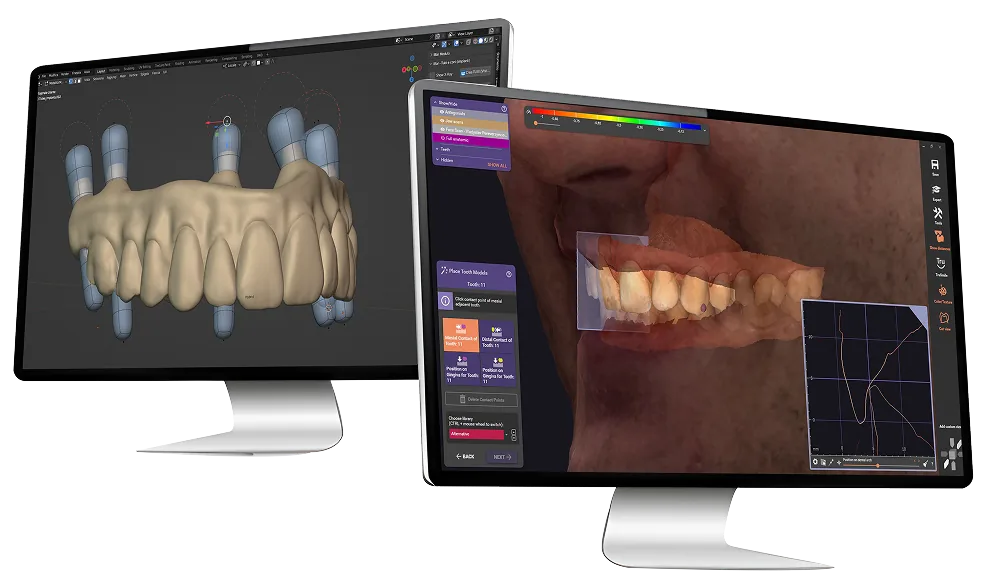
Setting up the software and the lab’s materials, then crowns and bridges step by step, with the parameters that decide the fit: cement gap, minimum thickness and connectors.
Implant work and bars
Implant libraries, screw-retained crowns and bridges, bars and full-arch frameworks, and how to check them before export.
Smile design and models
Smile Creator on photos and face scans, model design for printing, splints and night guards.
Blender for Dental
Designing restorations, models and appliances in Blender for Dental, with an Accredited Instructor.
3D printing and milling
File preparation, orientation and supports, printer setup and post-processing, and milling parameters and workflow.
Finishing and workflow
Finishing techniques for printed and milled materials, and how files and steps are organized from scan to production.
How the courses work
Every course combines theory and practice, with tools that can be used straight away in daily work.
-
Level and goals
Before the course we talk about your experience, the software version and the cases your lab produces, so the program starts from there.
-
Practice on real indications
Each topic is explained and then practiced on cases, ideally with anonymized scans from your own lab.
-
Back at the bench
The settings and steps from the course are the ones used in daily work, so they apply to the next case.

In person or live online
Courses run one to one or for a team, at the lab or online. In-person workshops add hands-on work with printers, mills and finishing. Live online sessions are interactive, with screen sharing, so you design on your own computer while you follow.
Request a course
Video courses on Udemy
The recorded courses run at your own pace, on any device. The lessons show the work inside the software, so you follow on your own computer and go back over a step whenever it needs a second look.
The iBar module is also covered in a written guide, from importing the scans to exporting the separated files.
Plan a course for you or your team
Book a short call about your level, the software you use and the cases you want to work on.